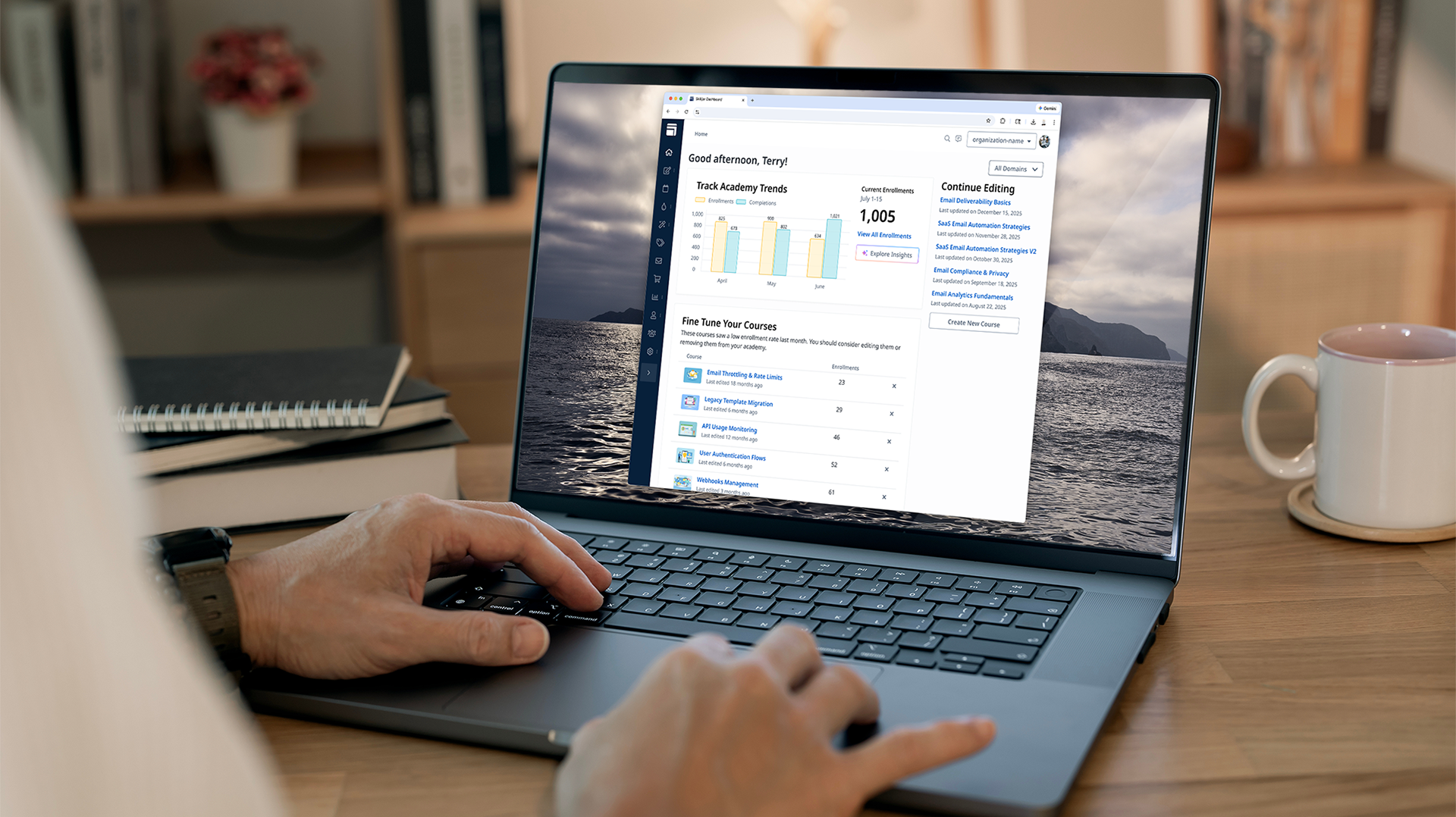

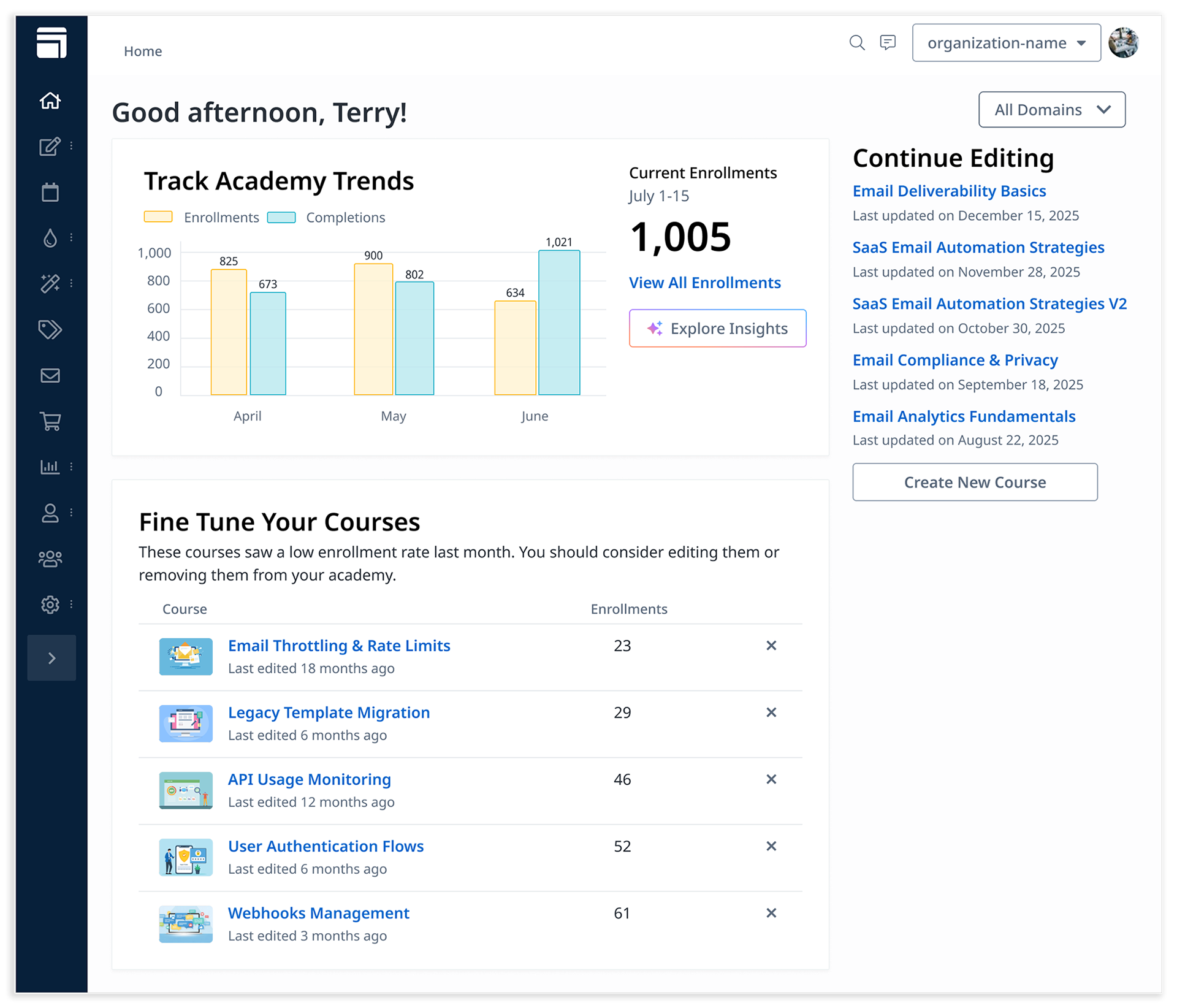
Skilljar Dashboard Home Page

Customer Enhancements and Principled Tradeoffs

The Skilljar dashboard is the primary workspace customers use to build, manage, and monitor their training academies. The home page had long been overlooked: risk and scope concerns repeatedly deprioritized a redesign. When a brief was approved and budget was allocated, the challenge wasn’t ideation, it was judgment. The dashboard touches every customer and role, so we needed to deliver value without over-investing or locking ourselves into the wrong long-term direction.
I was trusted to lead this redesign because I had a strong track record of making judgment calls on where and when to invest in product and design. The new home page would improve clarity around which courses were performing well, accelerate task completion, and surface actionable insights. I was responsible for research, stakeholder alignment, and design decisions to deliver high-value widgets within scope, strengthening demos and laying the foundation for AI-assisted workflows. The result: measurable improvements in customer engagement and a flexible platform for ongoing iteration.
Before
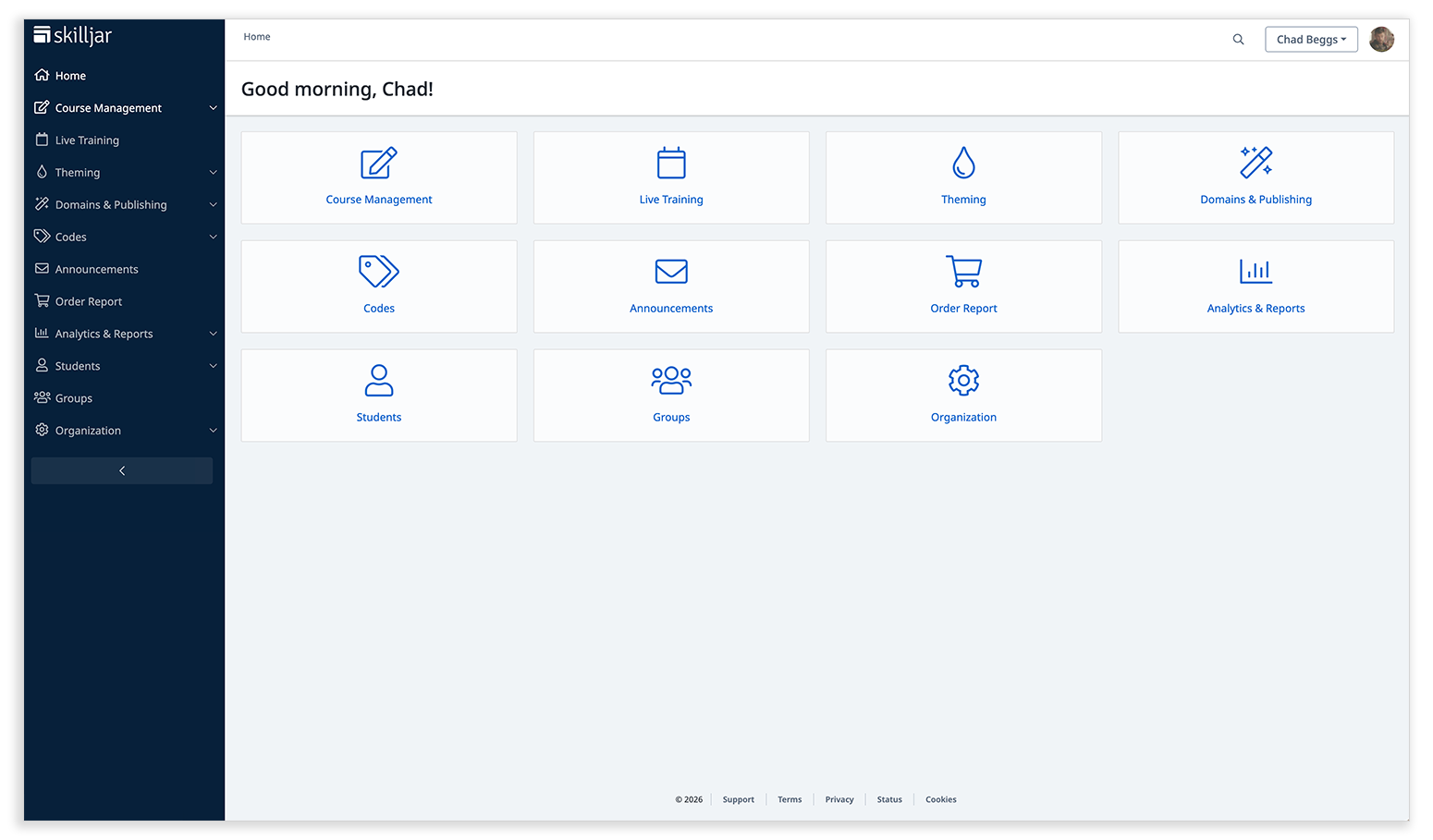
Before this work, the Skilljar dashboard home page functioned primarily as a visual extension of the left-hand navigation. Large buttons linked to areas customers could already access elsewhere, offering no new information or even guidance. The page provided no sense of momentum, no signal of what mattered, and no help prioritizing work.

The old dashboard homepage served as an extension of the left navigation. We knew that customers didn't use it, and there had been several attempts to update it over the years.

From a customer perspective, the home page added little value at it previously existed. From a business perspective, it represented wasted real estate in one of the most frequently viewed areas of the product. It made demos harder. Prospects would see the tool and struggle to understand what Skilljar enabled or why it was valuable.
Usage data and customer feedback confirmed what we suspected: customers ignored the home page altogether.
After
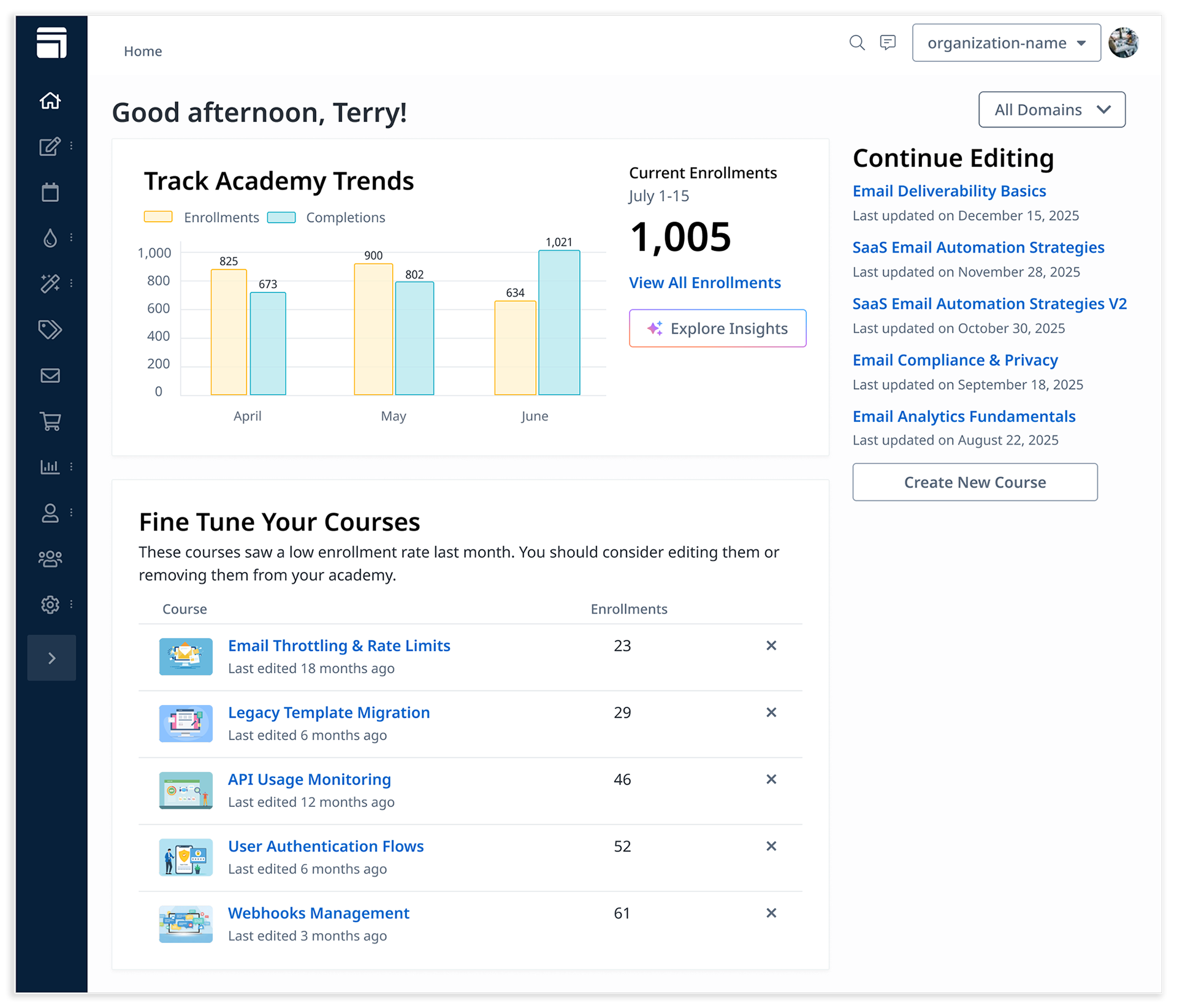
The redesigned dashboard home page introduced a set of focused widgets designed to help customers quickly understand what’s happening in their academy and decide what to do next.

The new home page gave customers immediate insight into how their academy is performing, and what should be looked at.

We landed on three core widgets:
Academy Enrollment Trends
A rolling three-month view of enrollments and completions, giving customers immediate visibility into how their academy is performing.
Pick Up Where You Left Off
A lightweight way for content creators to quickly return to unfinished work without hunting through the product.
Fine Tune Your Courses
A view that highlights underperforming courses, prompting admins to update or remove content that isn’t resonating.
Together, these widgets transform the home page from a passive navigation surface into an active starting point for decision-making, while remaining intentionally simple and approachable.
My Role
I led this project end-to-end as a Principal Product Designer, with a specific mandate: ensure we were building the right thing for the right level of investment.
My responsibilities included:
• Framing the problem and defining success with product and engineering leadership
• Leading customer research to identify high-value dashboard use cases
• Facilitating stakeholder sessions across product, engineering, sales, and customer success
• Designing and iterating on wireframes and mockups
• Partnering closely with engineering to stay within scope and budget
• Making principled tradeoffs to protect focus and long-term flexibility
Determining the Right Investment
One of the earliest - and most important - decisions was agreeing on what not to build.
The dashboard could have gone in many directions: deep analytics, AI-driven insights, heavy customization, or role-specific views. While all of these ideas had merit, pursuing them upfront would have dramatically increased scope, cost, and risk.

Extremely early dashboard thinking using mostly text to describe what we thought it "could" be. Some of these would make it through our research and development, others would not.

I worked with product and engineering leadership to align on a clear constraint: this first iteration needed to deliver immediate customer value without committing us to a long-term architectural direction too early.
This framing helped the team stay focused on outcomes rather than features.
Research and Validation
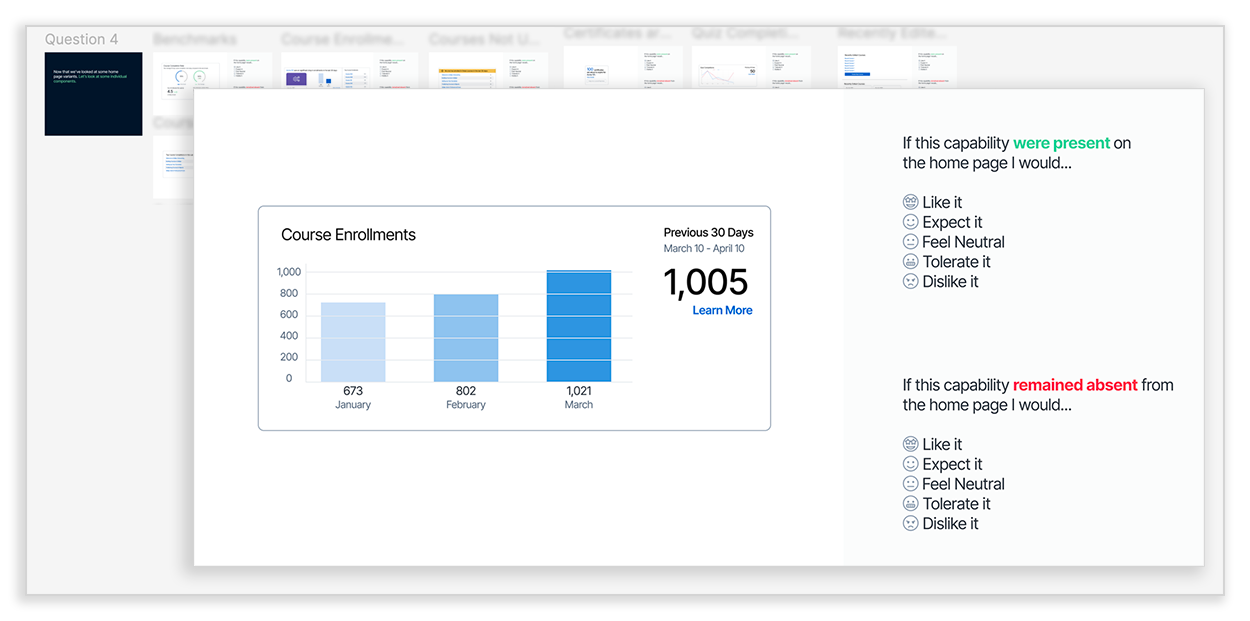
To ensure we were solving real problems, I led structured research sessions with customers across key roles. We walked participants through multiple high-level concepts for the dashboard and explored 20+ potential widget variations, gathering feedback on what would be most useful. Using the Kano model to gauge reactions we were able to prioritize the features that would deliver the most value.

Over 20 potential widget variations and combinations were tested using this model. After the study we looked at what got the most positive responses and compared them to the engineering effort to build them.

In parallel, I facilitated sessions with internal stakeholders across product, engineering, sales, and customer success to align customer needs with business objectives, demo considerations, and technical feasibility. 
This process produced a clear, prioritized set of concepts that informed the design phase and ensured our work was both customer-centered and achievable within budget.
Making Tradeoffs
Saying no (or at least “not yet”) was a significant part of the work.
Enrollment trends were limited to a three-month view, despite clear future opportunities for longer timelines. Showing longer timelines on the home page would mean that we'd have to rebuild some analytics infrastucture to get pages loading in an appropriate amount of time. This was a deal breaker. Our short term fix was to link the user to the enrollments report where they could download reports for that time frame.
Customization was deferred until the core value of the widgets could be validated in the real world, and additional widgets could be created. This would allow us to learn if we should go deeper on the widgets we built, or wider to account for more varied customer activities. This would be a long term tradeoff.
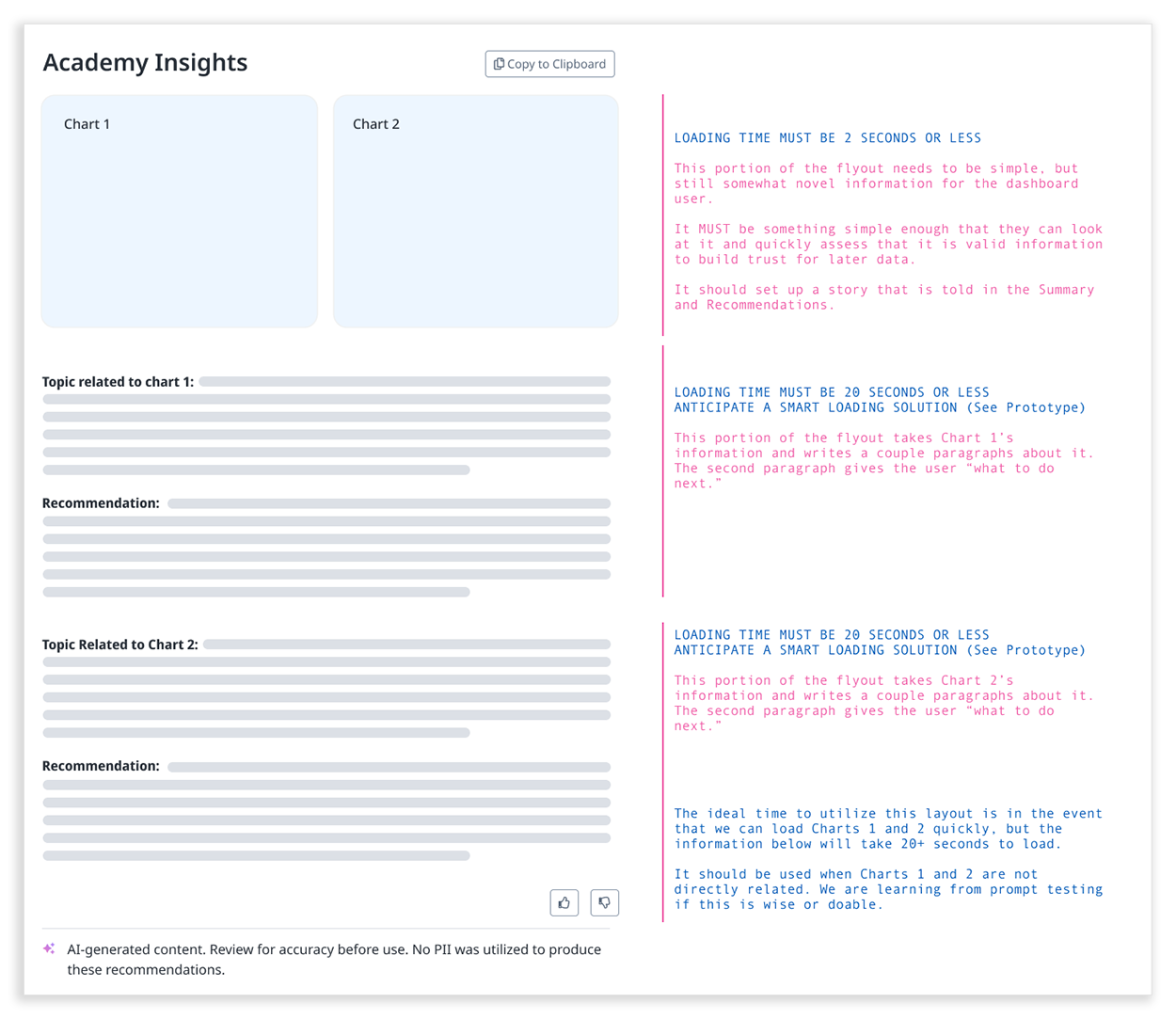
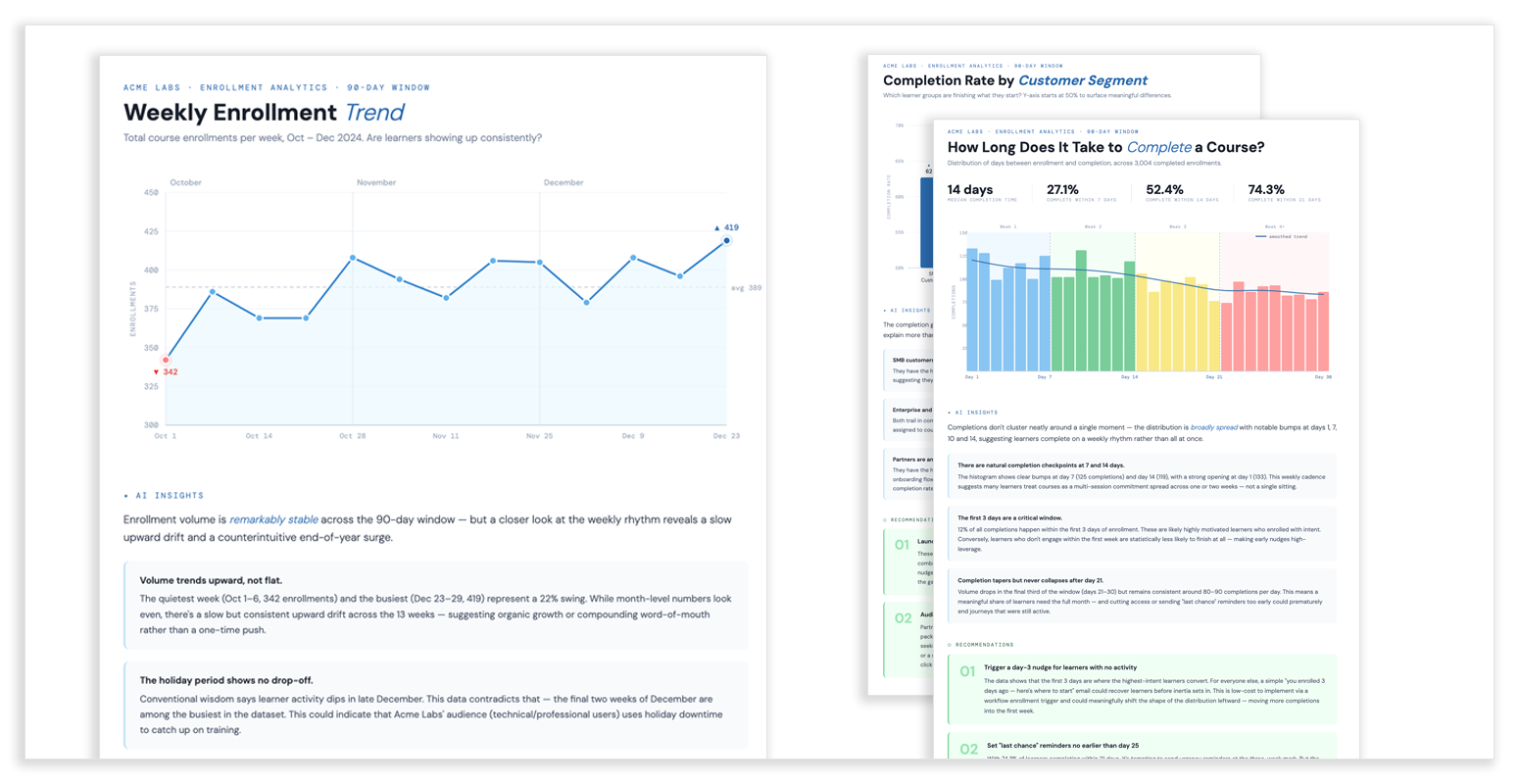
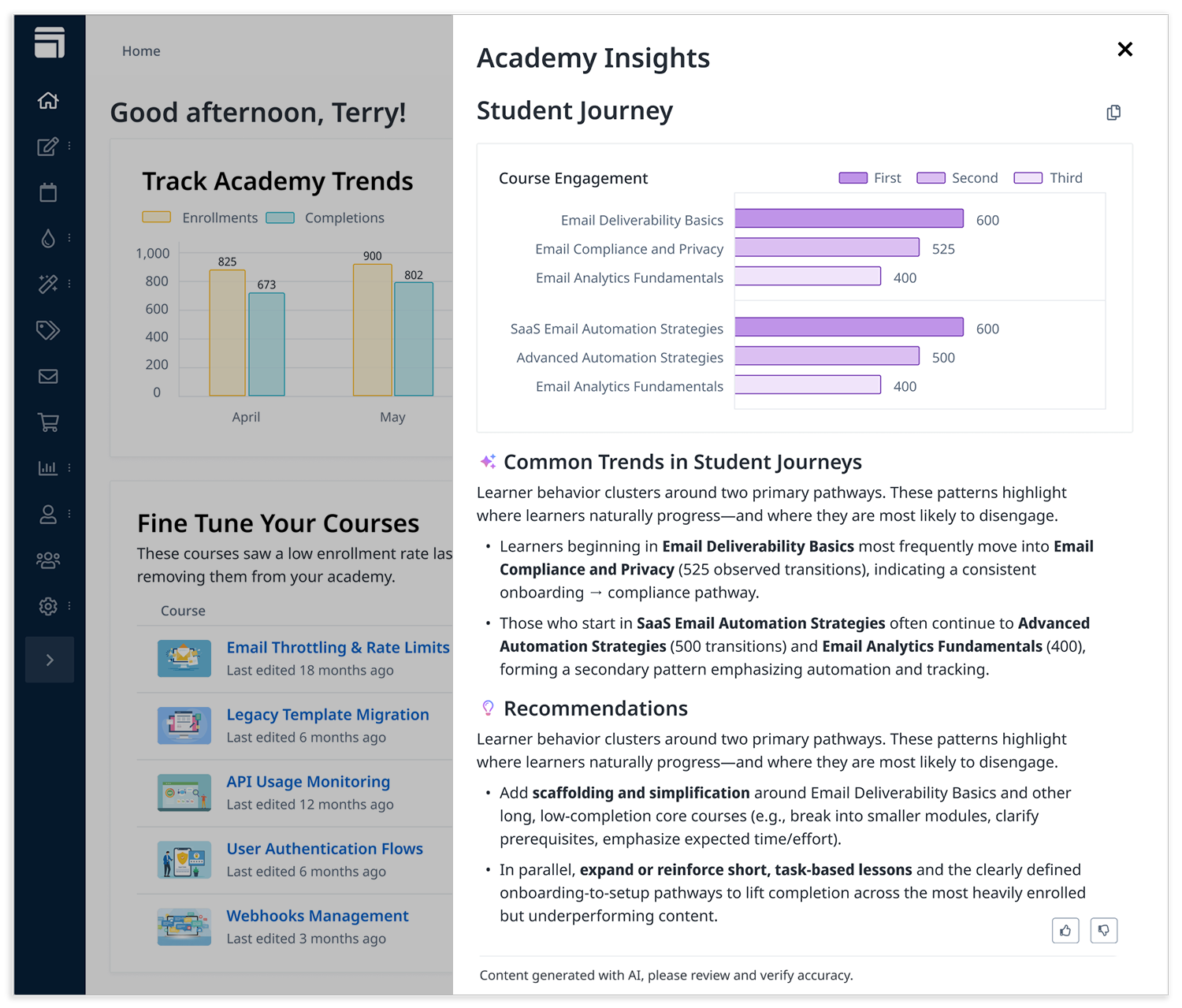
We knew customers wanted AI-driven insights on the dashboard. Research made this clear: admins wanted help identifying what courses to improve, what trends mattered, and what actions to take. AI could surface these insights automatically. This needed to be our short-term fast follow.
But we also knew rushing AI would be a mistake. The organizational requirements were significant: legal needed assurances around data handling, engineering needed clarity on model accuracy and performance, and we needed confidence that recommendations would be trustworthy and repeatable. Launching AI insights alongside the dashboard redesign would have delayed the entire project too much. 
After some discussions with the various teams and looking at timelines, I recommended we defer AI as a separate feature with dedicated rigor, while ensuring the Phase 1 work could support it without requiring a redesign. My PM partner and I would actively pursue it as the "next" item to work on. This was a difficult choice to make because there was clear signal for this capability.
AI-driven insights would be prioritized as a separate feature to be released after the initial launch. This allowed us to launch faster while giving the technology, experience, and prompt design the rigor they deserved. 
Finding Delightful Moments and
Raising the Bar on Craft

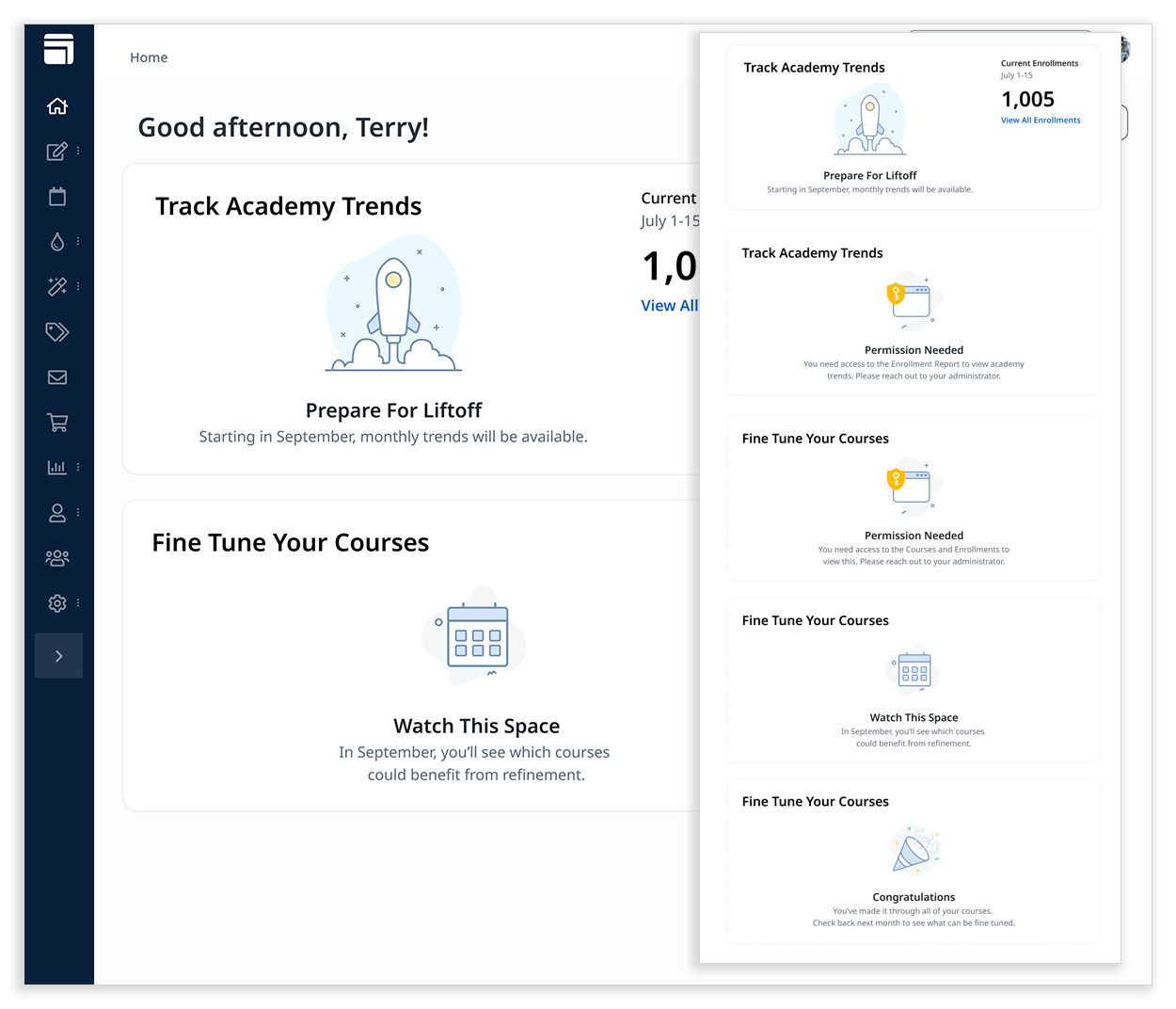
The various empty states for the dashboard. These included moments where the user would have to wait, moments of celebration, and permission issues.

While staying within the agreed engineering budget was a priority, we also looked for opportunities to improve the overall quality and polish of the dashboard experience. Even small moments of delight can meaningfully shape how customers perceive a product, especially on a surface they use every day.
As part of this work, I proposed updating Skilljar’s empty states and typography across the dashboard. The redesigned home page introduced more visual elements, which made the existing empty states feel out of place. This created an opportunity to raise the bar without dramatically expanding scope. We had a small gap in our front end work schedule to accomplish that and these would also be independently valuable.
While working on this project Skilljar would be acquired by Gainsight. We refreshed the empty states to better align with Gainsight’s design language following the acquisition, creating a more cohesive experience across products while introducing simple illustrations that added warmth without distraction. In parallel, we tightened typography across the dashboard - refining spacing, sizing, and type classes. Though largely a technical change, it noticeably improved clarity and visual hierarchy of the dashboard as a whole. A win in the broader product for our customers, all while staying in budget.
Outcome and What’s Next
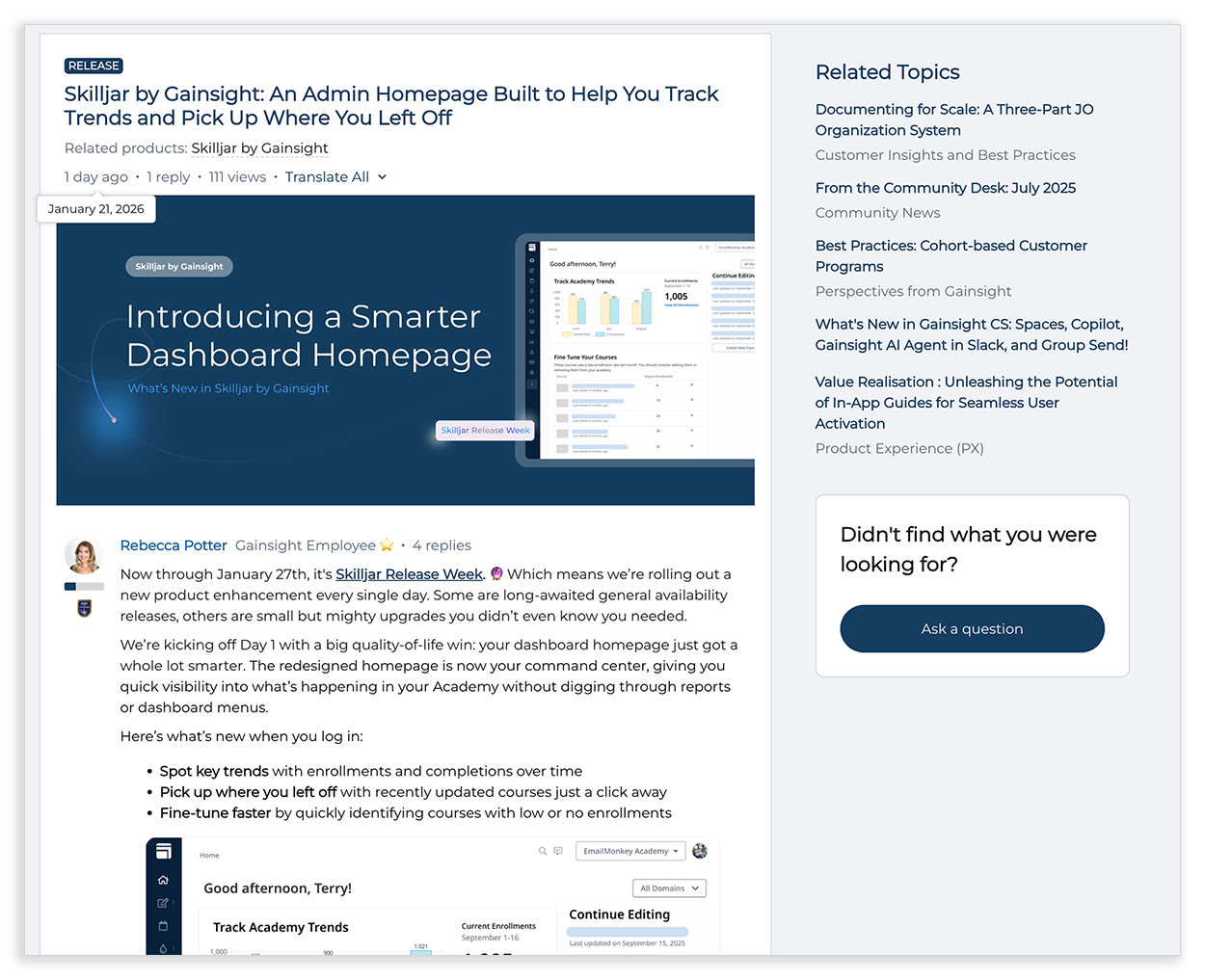
The redesigned dashboard home page has already begun to shift how customers and internal teams engage with Skilljar. It was selected to lead off a big event Skilljar put on showcasing new releases in January of 2026. Feedback indicates that it strengthens demos, helps content creators and admins quickly identify next steps, and surfaces insights that were previously hidden.

The Home Page would be the first item announced during release week.

Equally important, the redesign establishes a foundation for future iteration: new widgets, deeper analytics, or AI-assisted insights can be added incrementally, without requiring a large-scale redesign. Feedback mechanisms were intentionally placed into the project so that we could make those improvements based on real user needs, and not simply "vibes."
By focusing on a small set of high-value improvements, we were able to deliver meaningful impact quickly while preserving long-term flexibility.
Back to Top